
XPS 8920 Setup and Specifications
|
|
|
- Frieda van der Pol
- 8 jaren geleden
- Aantal bezoeken:
Transcriptie
1 XPS 8920 Setup and Specifications Model computer: XPS 8920 Regelgevingsmodel: D24M Regelgevingstype: D24M001
2 Opmerkingen, voorzorgsmaatregelen,en waarschuwingen OPMERKING: Een OPMERKING duidt belangrijke informatie aan voor een beter gebruik van het product. WAARSCHUWING: EEN WAARSCHUWING duidt potentiële schade aan hardware of potentieel gegevensverlies aan en vertelt u hoe het probleem kan worden vermeden. GEVAAR: Een GEVAAR-KENNISGEVING duidt op een risico op schade aan eigendommen, lichamelijk letsel of overlijden. Copyright 2017 Dell Inc. of zijn dochtermaatschappijen. Alle rechten voorbehouden. Dell, EMC, en andere handelsmerken zijn handelsmerken van Dell Inc. of zijn dochterondernemingen. Andere handelsmerken zijn mogelijk handelsmerken van hun respectieve eigenaren Ver. A00
3 Inhoudsopgave Set up your computer... 4 Setting up the Virtual Reality (VR) headset optional...9 Aanzichten Voorzijde...10 Back...12 Back panel Specificaties...16 Dimensions and weight System information...16 Memory Ports and connectors...17 Communications Audio...18 Storage Video Power ratings...19 Computer Environment...20 Hulp verkrijgen en contact opnemen met Dell...21 Bronnen voor zelfhulp Contact opnemen met Dell
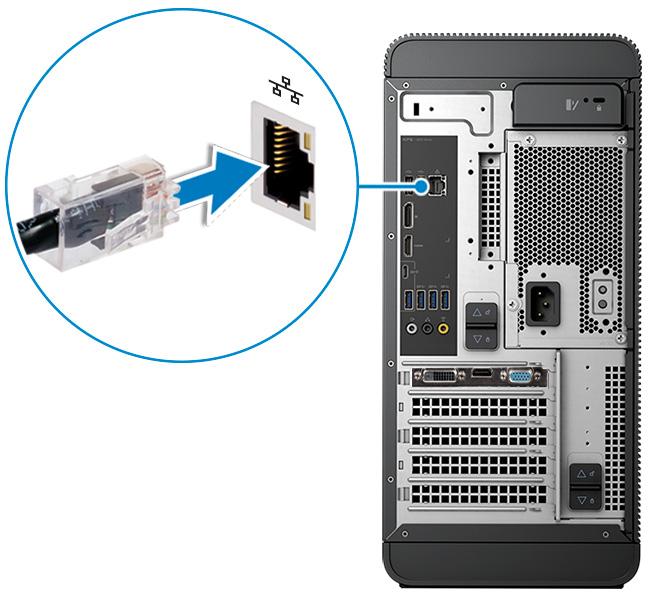
4 Set up your computer 1 Connect the keyboard and mouse. 2 Connect the network cable-optional. 4
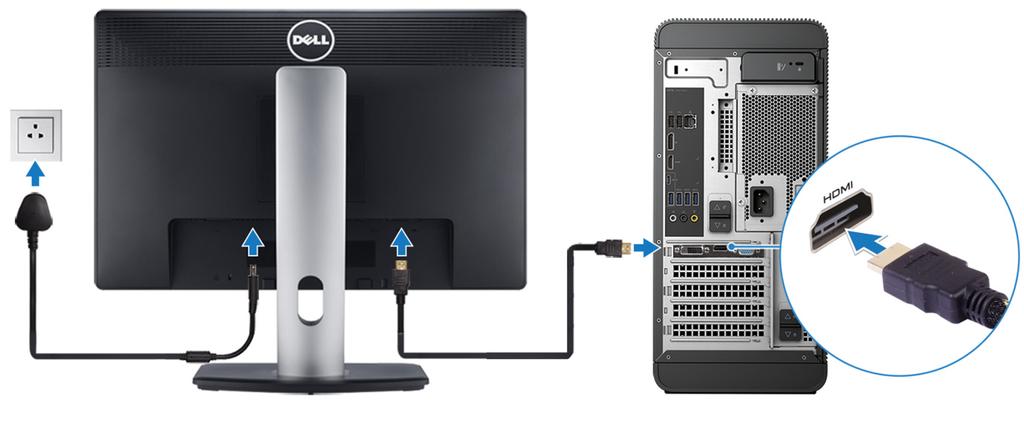
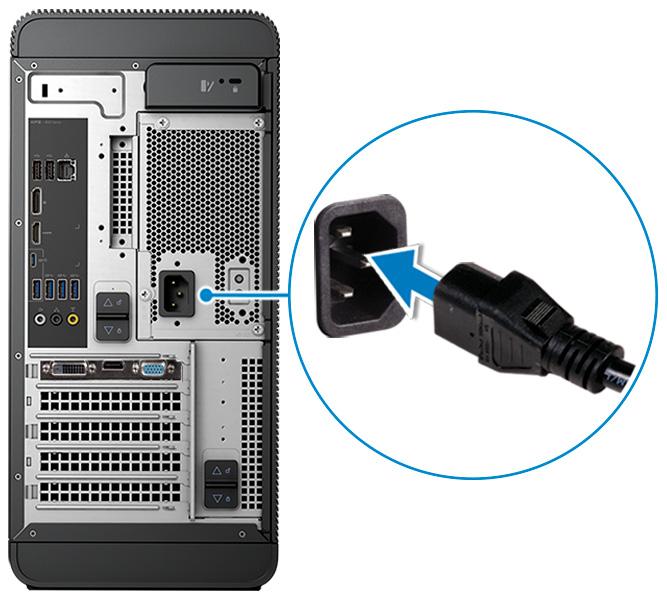
5 3 Connect the display. OPMERKING: If you ordered your computer with a discrete graphics card, the HDMI and the display ports on the back panel of your computer are covered. Connect the display to the discrete graphics card. 4 Connect the power cable. 5
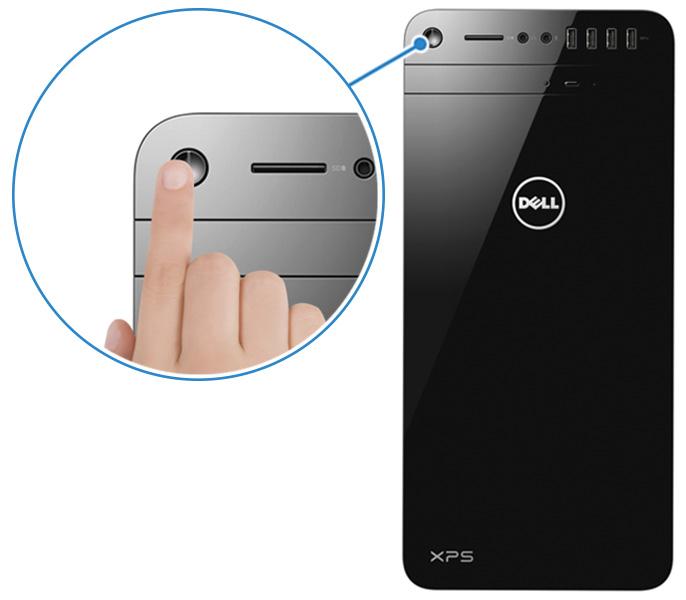
6 5 Press the power button. 6
7 6 Follow the instructions on the screen to finish Windows setup: a) Connect to a network. b) Sign-in to your Microsoft account or create a new account. 7


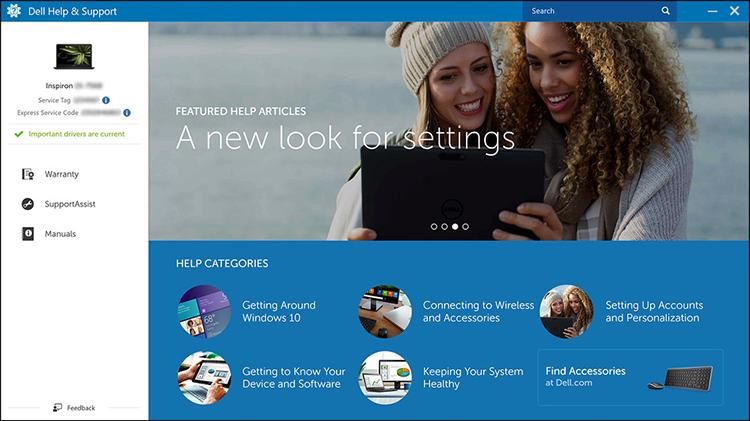

8 7 Locate Dell apps. Tabel 1. Locate Dell apps Register your computer Dell Help & Support SupportAssist Check and update your computer 8
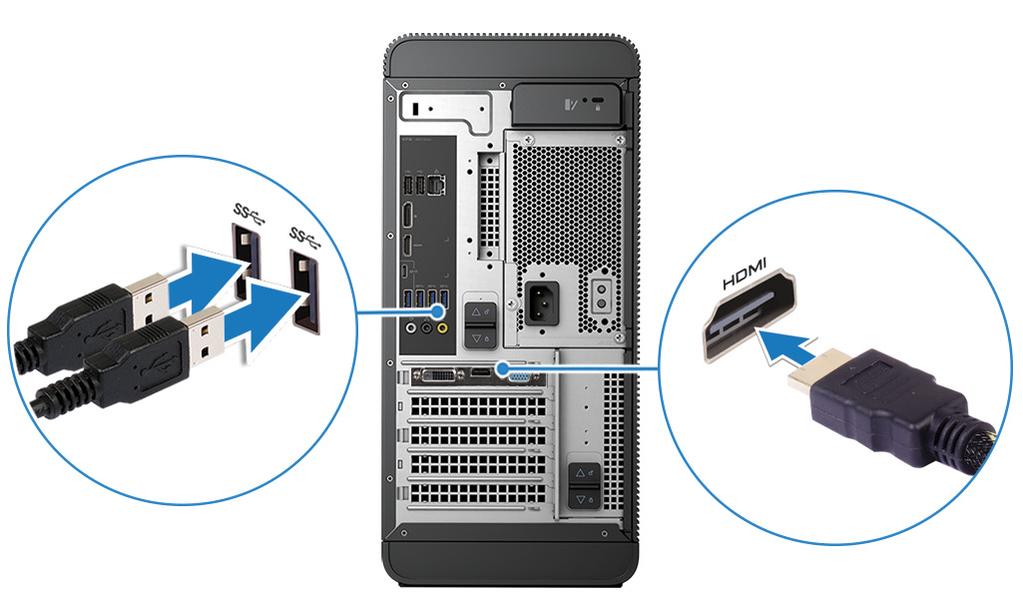
9 Setting up the Virtual Reality (VR) headset optional 1 Download and run the setup tools for your VR headset at VRsupport. 2 Connect the VR headset to the USB 3.0 ports on the back of your computer and HDMI port on your computer, when prompted. OPMERKING: Connect the headset to the HDMI port on the discrete graphics card and connect the display to any available port on the card. 3 Follow the instructions on the screen to complete the setup. 9
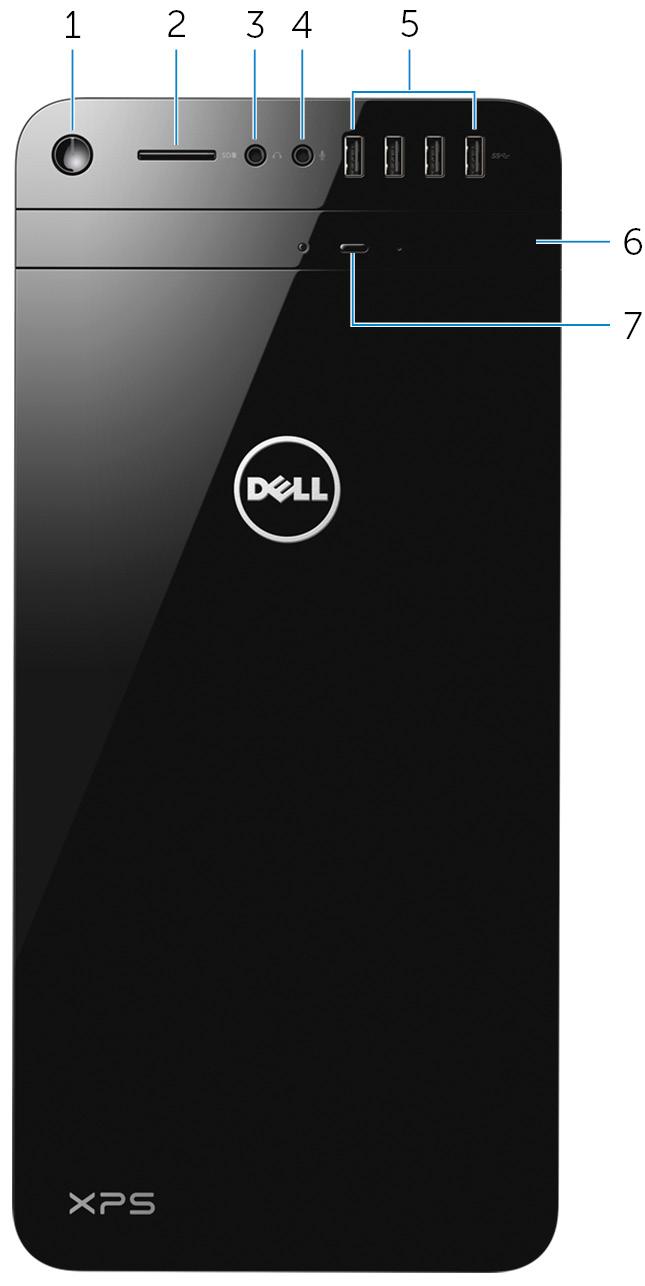
10 Aanzichten Voorzijde 1 Aan-/uitknop Druk op deze knop om de computer in te schakelen als de computer is uitgeschakeld of in de slaapstand staat. Druk op deze knop om de computer uit te schakelen als deze is ingeschakeld. Houd deze knop 4 seconden ingedrukt om de computer geforceerd uit te zetten. 10
11 OPMERKING: In Energiebeheer kunt u de functie van de aan-/uitknop instellen. Ga voor meer informatie naar Ik en mijn Dell op 2 Sleuf voor microsd-kaart Hiermee kunt u van en naar SD-kaarten lezen en schrijven. 3 Poort voor hoofdtelefoon Sluit een hoofdtelefoon of speakers aan. 4 Poort voor microfoon Sluit een externe microfoon aan voor geluidsopnamen, telefoongesprekken, videogesprekken enz. 5 USB 3.0-poorten (4) Sluit randapparatuur aan zoals opslagapparaten, printers, enz. Biedt gegevensoverdrachtsnelheden tot 5 Gbps. 6 Optisch station (optioneel) Hiermee kunt u cd's en dvd's lezen en naar cd's en dvd's schrijven. 7 Uitwerpknop optisch station Druk hierop om de media uit het optische station te werpen. 11

12 Back 1 Back panel Connect USB, audio, video and other devices. 2 PCI-Express x16 (graphics slot 1) Connect a PCI-Express card such as graphics, audio, or network card to enhance the capabilities of your computer. For optimal graphics performance, use this slot for connecting the graphics card. 3 PCI-Express x1 slots (2) Connect a PCI-Express card such as graphics, audio, or network card to enhance the capabilities of your computer. 12
13 4 PCI-Express x4 slot Connect a PCI-Express card such as graphics, audio, or network card to enhance the capabilities of your computer. 5 Regulatory label Contains regulatory information about your computer. 6 Bottom power-supply cage release-latch Allows you to remove the power supply unit from your computer. 7 Service Tag label Provides the Service Tag and Express Service Code needed when contacting Dell. 8 Top power-supply cage release-latch Allows you to remove the power supply unit from your computer. 9 Power supply light Indicates the power-supply state. 10 Power-supply diagnostic button Press to check the power supply state. 11 Power port Connect a power cable to provide power to your computer. 12 Security-cable slot Connect a security cable to prevent unauthorized movement of your computer. 13
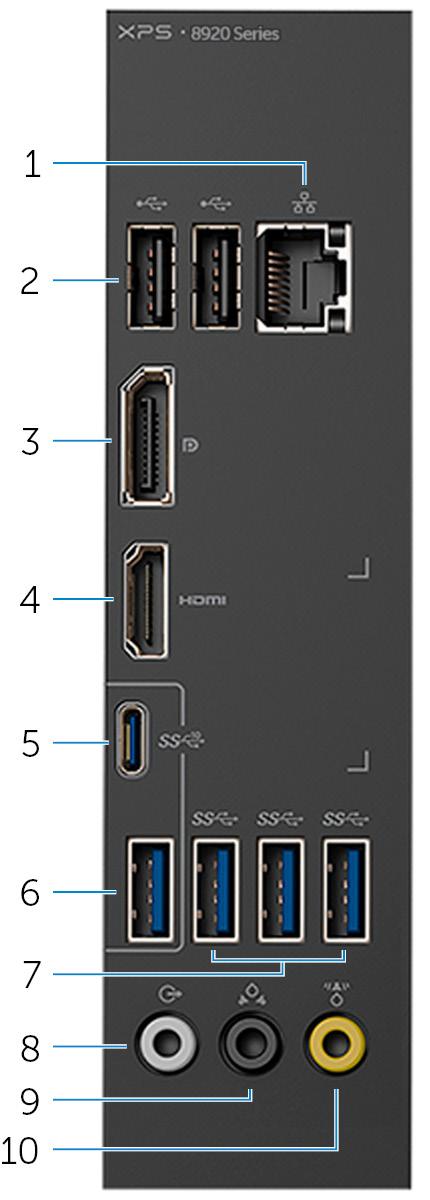
14 Back panel 1 Network port Connect an Ethernet (RJ45) cable from a router or a broadband modem for network or internet access. The two lights next to the connector indicate the connectivity status and network activity. 2 USB 2.0 ports (2) Connect peripherals such as storage devices and printers. Provides data transfer speeds up to 480 Mbps. 3 DisplayPort Connect an external display or a projector. 14
15 4 HDMI port OPMERKING: If you ordered your computer with a discrete graphics card, the DisplayPort on the back panel of your computer is covered. Connect the display to the discrete graphics card of your computer. Connect a TV or another HDMI-in enabled device. Provides video and audio output. OPMERKING: If you ordered your computer with a discrete graphics card, the HDMI port on the back panel of your computer is covered. Connect the display to the discrete graphics card of your computer. 5 USB 3.1 Type-C port Connect peripherals such as external storage devices and printers. Provides data transfer speeds up to 10 Gbps. 6 USB 3.1 port Connect peripherals, such as storage devices and printers. Provides data transfer speeds up to 10 Gbps. 7 USB 3.0 ports (3) Connect peripherals such as storage devices and printers. Provides data transfer speeds up to 5 Gbps. 8 Front L/R surround line-out port Connect audio-output devices such as speakers and amplifiers. In a 5.1 speaker channel setup, connect the front-left and front-right speakers. 9 Rear L/R surround port Connect audio-output devices such as speakers and amplifiers. In a 5.1 speaker channel setup, connect the rear-left and rear-right speakers. 10 Center/subwoofer LFE surround port Connect the subwoofer. OPMERKING: For more information about the speaker setup, refer to the documentation that shipped with the speakers. 15
16 Specificaties Dimensions and weight Tabel 2. Dimensions and weight Height Width Depth Weight 389 mm (15.32 in) 180 mm (7.09 in) 356 mm (14.02 in) 10 kg (22 lb) OPMERKING: The weight of your computer varies depending on the configuration ordered and the manufacturing variability. System information Tabel 3. System information Computer model XPS 8920 Processor Chipset 7 th Generation Intel Core i5/i5k 7 th Generation Intel Core i7/i7k Intel H270 Intel Z270 Memory Tabel 4. Memory specifications Slots Type Four DIMM slots UDIMM DDR4 16
17 Speed Configurations supported 2400 MHz 8 GB, 16 GB, 24 GB, 32 and 64 GB Ports and connectors Tabel 5. Ports and connectors Back panel ports: Network USB Video/Audio One RJ45 port Two USB 2.0 ports Three USB 3.0 ports One USB 3.1 Type-A port One USB 3.1 Type-C port One Surround Front Stereo port One Surround Rear Stereo port One Surround Center/Subwoofer port One HDMI port for integrated graphics One DisplayPort for integrated graphics Tabel 6. Ports and connectors Front panel ports: Audio USB Card Reader One Stereo Headphone jack One Microphone jack Four USB 3.0 ports One 3-in-1 Card reader, supporting: Secure Digital (SD) Secure Digital Extended Capacity (SDXC) 17
18 Front panel ports: Secure Digital High Capacity (SDHC) Classes 2,4 and 6 Tabel 7. Ports and connectors Internal ports: PCIe Slots M.2 Card One PCIe x16 card slot Two PCIe x1 card slots One PCIe x4 card slot One M.2 card slot for SSD One M.2 card slot for Wi-Fi and Bluetooth combo card Communications Tabel 8. Supported communications Ethernet Wireless 10/100/1000 Mbps Ethernet controller integrated on system board Wi-Fi b/g/n Wi-Fi ac Bluetooth 4.0 Audio Tabel 9. Audio specifications Controller Integrated Realtek ALC3861 High Definition Audio with Waves MaxxAudio Pro 18
19 Storage Tabel 10. Storage options Interface Hard drive Solid-state drive Optical drive (optional) SATA 6 Gbps for optical drive SATA 6 Gbps for hard drive M.2 for SSD Three 3.5-inch hard drives One M.2 slot One Slimline DVD+/-RW Video Tabel 11. Video specifications Integrated Controller Intel HD Graphics 630 Discrete NVIDIA GT 730 NVIDIA GTX 745 NVIDIA GTX 1050 Ti NVIDIA GTX 1070 NVIDIA GTX 1080 AMD Radeon RX 460 AMD Radeon RX 470 AMD Radeon RX 480 Memory Shared system memory Up to 8 GB GDDR5X Power ratings Tabel 12. Power ratings Type 460 W APFC 460 W Bronze Input current 8 A 8 A 19
20 Output current Rated output voltage Input voltage Input frequency Temperature range: Operating Temperature range: Storage 3.3V/17A, 5V/25A, 12VA/ 18A, 12VB/16A, 12VC/8A, 5Vaux/3A 3.3V, 5V, 12VA, 12VB, 12VC, 5Vaux 100 VAC 240 VAC 50 Hz 60 Hz 3.3V/17A, 5V/25A, 12VA/ 18A, 12VB/16A, 12VC/8A, 5Vaux/3A 3.3V, 5V, 12VA, 12VB, 12VC, 5Vaux 5 C to 50 C (41 F to 122 F) 40 C to 70 C ( 40 F to 158 F) Computer Environment Airborne contaminant level: G2 or lower as defined by ISA-S Tabel 13. Computer Environment Temperature range Relative humidity (maximum) Operating 5 C to 35 C (41 F to 95 F) 10% to 90% (noncondensing) Storage 40 C to 65 C ( 40 F to 149 F) 0% to 95% (noncondensing) Vibration (maximum) * 0.26 GRMS 1.37 GRMS Shock (maximum) 40 G for 2 ms with a change in velocity of 20 in/s (51 cm/s) Altitude (maximum) m to 3048 m ( 50 ft to 10,000 ft) 105 G for 2 ms with a change in velocity of 52.5 in/s (133 cm/s) m to 10,668 m ( 50 ft to 35,000 ft) * Measured using a random vibration spectrum that simulates user environment. Measured using a 2 ms half-sine pulse when the hard drive is in use. 20
21 Hulp verkrijgen en contact opnemen met Dell Bronnen voor zelfhulp U kunt informatie en hulp bij Dell-producten en services krijgen door middel van deze bronnen voor zelfhulp. Tabel 14. Bronnen voor zelfhulp Informatie over producten en services van Dell App Dell Help en ondersteuning App Aan de slag Help openen Online help voor besturingssysteem Informatie over probleemoplossing, gebruikershandleidingen, instructies voor installatie, productspecificaties, technische ondersteuningsblogs, stuurprogramma's, software-updates enzovoorts. Informatie over uw besturingssysteem, instellen en gebruiken van uw computer, databack-ups, diagnostieken, enzovoorts. In Windows Zoeken typt u Help and Support, en drukt u op Enter. Ga naar Ik en mijn Dell op support/manuals. 21
22 Contact opnemen met Dell Ga naar als u contact wilt opnemen met Dell voor verkoop, technische ondersteuning of aan de klantenservice gerelateerde zaken. OPMERKING: De beschikbaarheid hiervan verschilt per land en product. Sommige services zijn mogelijk niet beschikbaar in uw land. OPMERKING: Als u geen actieve internetverbinding hebt, kunt u de contactgegevens vinden op de factuur, de pakbon of in de productcatalogus van Dell. 22
Aurora R6 Installatie en specificaties
 Aurora R6 Installatie en specificaties Model computer: Alienware Aurora R6 Regelgevingsmodel: D23M Regelgevingstype: D23M001 Opmerkingen, voorzorgsmaatregelen,en waarschuwingen OPMERKING: Een OPMERKING
Inspiron Installatie en specificaties
 Inspiron 24 5000 Installatie en specificaties Model computer: Inspiron 24-5459 Regelgevingsmodel: W12C Regelgevingstype: W12C004 Opmerkingen, voorzorgsmaatregelen,en waarschuwingen OPMERKING: Een OPMERKING
Inspiron 22. Installatie en specificaties. 3000-serie. Model computer: Inspiron 22-3265 Regelgevingsmodel: W17B Regelgevingstype: W17B001
 Inspiron 22 3000-serie Installatie en specificaties Model computer: Inspiron 22-3265 Regelgevingsmodel: W17B Regelgevingstype: W17B001 Opmerkingen, voorzorgsmaatregelen,en waarschuwingen OPMERKING: Een
Inspiron Installatie en specificaties
 Inspiron 24 5000 Installatie en specificaties Model computer: Inspiron 24-5475 Regelgevingsmodel: W15C Regelgevingstype: W15C001 Opmerkingen, voorzorgsmaatregelen,en waarschuwingen OPMERKING: Een OPMERKING
Inspiron Installatie en specificaties
 Inspiron 15 3000 Installatie en specificaties Model computer: Inspiron 15-3567 Regelgevingsmodel: P63F Regelgevingstype: P63F002 Opmerkingen, voorzorgsmaatregelen,en waarschuwingen OPMERKING: Een OPMERKING
Alienware Area-51 R5 Installatie en specificaties
 Alienware Area-51 R5 Installatie en specificaties Model computer: Alienware Area-51 R5 Regelgevingsmodel: D03X Regelgevingstype: D03X002 Opmerkingen, voorzorgsmaatregelen,en waarschuwingen OPMERKING: Een
XPS 13 Installatie en specificaties
 XPS 13 Installatie en specificaties Model computer: XPS 9360 Regelgevingsmodel: P54G Regelgevingstype: P54G002 Opmerkingen, voorzorgsmaatregelen,en waarschuwingen OPMERKING: Een OPMERKING duidt belangrijke
XPS 8930 Installatie en specificaties
 XPS 8930 Installatie en specificaties Model computer: XPS 8930 Regelgevingsmodel: D24M Regelgevingstype: D24M002 Opmerkingen, voorzorgsmaatregelen,en waarschuwingen OPMERKING: Een OPMERKING duidt belangrijke
Inspiron Installatie en specificaties
 Inspiron 24 3000 Installatie en specificaties Model computer: Inspiron 24-3464 Regelgevingsmodel: W12C Regelgevingstype: W12C006 Opmerkingen, voorzorgsmaatregelen,en waarschuwingen OPMERKING: Een OPMERKING
Inspiron Installatie en specificaties. 2-in-1. Model computer: Inspiron Regelgevingsmodel: P58F Regelgevingstype: P58F001
 Inspiron 15 5000 2-in-1 Installatie en specificaties Model computer: Inspiron 15-5578 Regelgevingsmodel: P58F Regelgevingstype: P58F001 Opmerkingen, voorzorgsmaatregelen,en waarschuwingen OPMERKING: Een
Inspiron Installatie en specificaties. Model computer: Inspiron 3670 Regelgevingsmodel: D19M Regelgevingstype: D19M005
 Inspiron 3670 Installatie en specificaties Model computer: Inspiron 3670 Regelgevingsmodel: D19M Regelgevingstype: D19M005 Opmerkingen, voorzorgsmaatregelen,en waarschuwingen OPMERKING: Een OPMERKING duidt
Dell Optiplex 390. Informatie over installatie en functies. Waarschuwingen. Mini-Tower Voor- en achteraanzicht
 Dell Optiplex 390 Informatie over installatie en functies Waarschuwingen GEVAAR: Een WAARSCHUWING duidt een risico van schade aan eigendommen, lichamelijk letsel of overlijden aan. Mini-Tower Voor- en
Inspiron Installatie en specificaties. Model computer: Inspiron Regelgevingsmodel: P66F Regelgevingstype: P66F001
 Inspiron 15 5000 Installatie en specificaties Model computer: Inspiron 15-5567 Regelgevingsmodel: P66F Regelgevingstype: P66F001 Opmerkingen, voorzorgsmaatregelen,en waarschuwingen OPMERKING: Een OPMERKING
Advies, Productie, Reproductie, Faciliteiten, Presentatie, Verhuur, Verkoop
 Hardware BrightSign mediaplayers HD110, HD120, HD210(W), HD220, HD410, HD810, HD1010(W), HD1020 Ports Achterzijde van de unit: Power plug for 5V power input at 3A 10/100 Ethernet jack HDMI connector Triple
Van den Brink ICT / Enkweg 3a / 7251 EV VORDEN / Tel: 0575 55 43 11 / www.vandenbrinkict.nl
 ʺ Notebooks built by Van den Brink ICTʺ 499,00 Compal KTV00 Barebone / Mobile Intel 945GSE Express (945GSE + ICH7 M) Intel Atom N280 CPU + 945GSE + ICH7M 2GB DDR2 800MHz (1x 2GB) Dual Channel 160GB 7200Rpm
Inspiron 13. 7000-serie. Aanzichten. Modi. Specificaties
 Inspiron 13 7000-serie Aanzichten Modi Copyright 2014 Dell Inc. Alle rechten voorbehouden. Dit product wordt beschermd door Amerikaanse en internationale copyright- en intellectuele eigendomsrechten. Dell
Alienware 17 R4 Installatie en specificaties
 Alienware 17 R4 Installatie en specificaties Model computer: Alienware 17 R4 Regelgevingsmodel: P31E Regelgevingstype: P31E001 Opmerkingen, voorzorgsmaatregelen,en waarschuwingen OPMERKING: Een OPMERKING
Alienware Area 51 Installatie en specificaties
 Alienware Area 51 Installatie en specificaties Model computer: Alienware Area-51 R3 Regelgevingsmodel: D03X Regelgevingstype: D03X003 Opmerkingen, voorzorgsmaatregelen,en waarschuwingen OPMERKING: Een
Dell OptiPlex 990. Informatie over installatie en functies. Waarschuwingen. Mini Tower Voor- en achteraanzicht
 Dell OptiPlex 990 Informatie over installatie en functies Waarschuwingen GEVAAR: Een WAARSCHUWING duidt een risico van schade aan eigendommen, lichamelijk letsel of overlijden aan. Mini Tower Voor- en
Settings for the C100BRS4 MAC Address Spoofing with cable Internet.
 Settings for the C100BRS4 MAC Address Spoofing with cable Internet. General: Please use the latest firmware for the router. The firmware is available on http://www.conceptronic.net! Use Firmware version
Alienware 15 R3 Installatie en specificaties
 Alienware 15 R3 Installatie en specificaties Model computer: Alienware 15 R3 Regelgevingsmodel: P69F Regelgevingstype: P69F001 Opmerkingen, voorzorgsmaatregelen,en waarschuwingen OPMERKING: Een OPMERKING
Dell OptiPlex 790. Informatie over installatie en functies. Waarschuwingen. Mini-Tower Voor- en achteraanzicht
 Dell OptiPlex 790 Informatie over installatie en functies Waarschuwingen GEVAAR: Een WAARSCHUWING duidt een risico van schade aan eigendommen, lichamelijk letsel of overlijden aan. Voor- en achteraanzicht
Bijlage 2: Specificaties. 1 Specificaties Desktop computer
 Bijlage 2: 1 Desktop computer Opdrachtgever eist dat de aan te schaffen hardware van een gerenommeerd merk is en geen gereviseerde hardware (ook wel refurbished genoemd). Omschrijving Afmetingen Invulling
Van den Brink ICT / Enkweg 3a / 7251 EV VORDEN / Tel: 0575 55 43 11 / www.vandenbrinkict.nl
 Van den Brink ICT Pentium Dual Core Performer 599,00 Intel Desktop Board DH61BE Classic Series Intel Pentium Processor G620 (3M Cache, 2.60 GHz) Dual Channel On-Board Intel HD Graphics Controller Samsung
Format C Weggestraat 13, 2170 Merksem Tel.:
 Format C Weggestraat 13, 2170 Merksem Tel.: 03 641 63 30 E-mail: [email protected] Code: Vendor code: EAN code: Intel Core i7-7700hq (6MB Cache, 2.8GHz), 16GB DDR4-SDRAM, 1000GB HDD, 256 SSD, 43.9 cm (17.3")
Inspiron 13. Installatie en specificaties. 5000-series 2-in-1. Model computer: Inspiron 13-5368 Regelgevingsmodel: P69G Regelgevingstype: P69G001
 Inspiron 13 5000-series 2-in-1 Installatie en specificaties Model computer: Inspiron 13-5368 Regelgevingsmodel: P69G Regelgevingstype: P69G001 Opmerkingen, voorzorgsmaatregelen,en waarschuwingen OPMERKING:
Aankondiging. voorwerp. Dell Werkstations. Type opdracht. levering. Plaats. Helmond. Beschrijving
 Aankondiging voorwerp Dell Werkstations Type opdracht levering Plaats Helmond Beschrijving Binnen hogeschool de Kempel staan ongeveer 225 werkstations. Deze worden intensief gebruikt door verschillende
Laptop Folder. De prijzen die in deze folder staan vermeld zijn incl. Btw en startklaar geleverd en excl. arbeid en voorrijkosten op locatie.
 Laptop Folder 2017 Dit is onze laptop folder, hierin vindt u verschillende merken maar altijd met minimaal 2 jaar garantie. Deze garantie is op "hardware" en wij geven deze garantie aan "huis". De prijzen
Alienware 13 R3 Installatie en specificaties
 Alienware 13 R3 Installatie en specificaties Model computer: Alienware 13 R3 Regelgevingsmodel: P81G Regelgevingstype: P81G001 Opmerkingen, voorzorgsmaatregelen,en waarschuwingen OPMERKING: Een OPMERKING
MERIDIAN. Componenten 1/5
 1/5 Componenten Audio Core 200 is verkrijgbaar in hoogglans witte en hoogglans zwarte afwerking; De producten uit de G serie zijn verkrijgbaar in een zilver en zwarte geanodiseerde aluminium uitvoering.
Dell Latitude 3440/3540
 Dell Latitude 3440/3540 Informatie over installatie en functies Waarschuwingen GEVAAR: Een WAARSCHUWING duidt een risico van schade aan eigendommen, lichamelijk letsel of overlijden aan. Latitude 3440:
Dell Latitude Informatie over installatie en functies. Vooraanzicht. Waarschuwingen
 Dell Latitude 3330 Informatie over installatie en functies Waarschuwingen GEVAAR: Een WAARSCHUWING duidt een risico van schade aan eigendommen, lichamelijk letsel of overlijden aan. Vooraanzicht Afbeelding
SPL D2 MKII GEBRUIKSAANWIJZING USER MANUAL
 SPL D2 MKII GEBRUIKSAANWIJZING USER MANUAL Spl-D2 Next generation Inleiding De SPL5-D2 unit is een geluidsdrukmeter die gekoppeld kan worden aan de SPL5. Het apparaat kan ook als losse geluidsdrukmeter
MERIDIAN. Componenten 1/5
 1/5 Componenten Audio Core 200 is verkrijgbaar in hoogglans witte en hoogglans zwarte afwerking; De producten uit de G serie zijn verkrijgbaar in een zilver en zwarte geanodiseerde aluminium uitvoering.